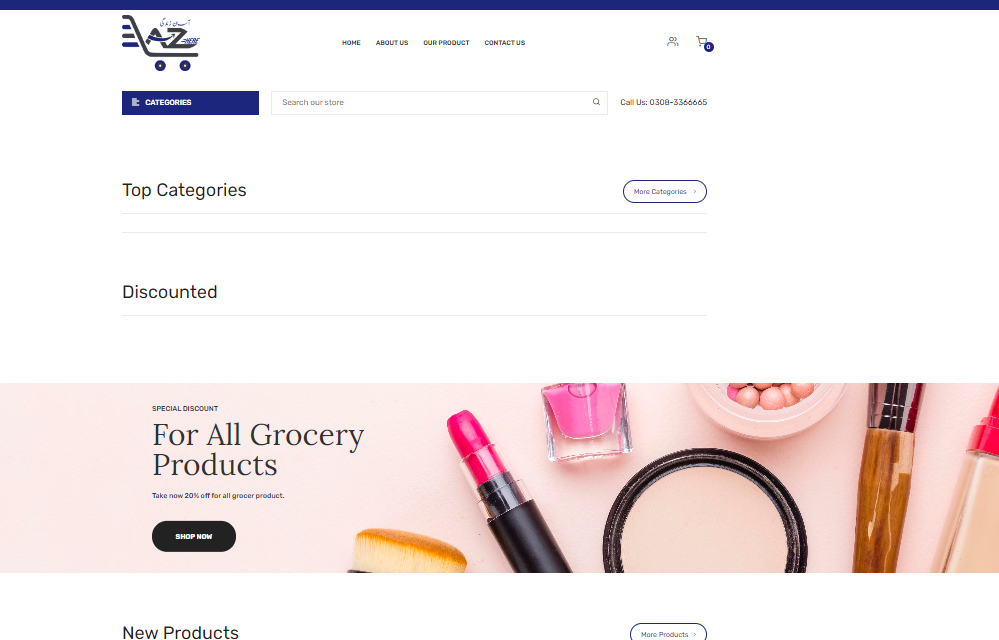
AbBoom Collection
AbBoom Collection E-commerce Website (WordPress)
AbBoom Collection is a high-performance, feature-rich eCommerce platform built on WordPress with the help of WooCommerce. It serves as an online store specializing in selling fashion, accessories, or lifestyle products, delivering a seamless shopping experience for customers. Designed with modern aesthetics and equipped with powerful functionality, the site reflects the core values of the AbBoom brand—style, accessibility, and convenience.
Key Features of AbBoom Collection
User-Friendly Interface
- The website is designed with a clean, minimalistic layout to ensure easy navigation for customers.
- Key pages such as Shop, Product Categories, Wishlist, Cart, and Checkout are accessible within a few clicks.
- The design is responsive and optimized for both desktop and mobile devices, providing a flawless shopping experience on all platforms.
WooCommerce Integration
- WooCommerce powers the eCommerce functionality, offering a secure and flexible shopping cart solution.
- The product catalog is structured with categories, tags, and filters to make browsing effortless.
- Users can add products to their Wishlist for future purchases and track order statuses directly from their accounts.
Product Management
- The admin panel allows easy management of products, with options to add, update, or delete listings.
- Each product page includes high-quality images, detailed descriptions, reviews, and availability statuses.
- Support for variable products (e.g., sizes, colors) ensures customers have more customization options.
Payment Gateway Integration
- The website supports multiple payment methods such as PayPal, Stripe, and COD (Cash on Delivery).
- SSL encryption secures transactions, ensuring customer data remains protected.
Shipping & Tax Management
- Real-time shipping calculations are integrated to provide accurate delivery charges at checkout.
- Tax settings are configured to comply with local regulations, with automatic tax calculations at the checkout stage.
Search and Filter System
- The platform features a robust search and filter system, allowing customers to search by price range, category, or keywords.
- This feature ensures faster access to specific products, enhancing the overall user experience.
Product Recommendations and Upselling
- Implementing related products and upselling techniques on product pages helps increase conversions.
- Customers are shown similar items or bestsellers to encourage additional purchases.
Customer Reviews & Ratings
- Users can leave reviews on product pages, building trust and engagement with other shoppers.
- The rating system ensures that only verified buyers can post reviews, adding credibility to the feedback.
Discounts, Coupons, and Promotions
- The platform supports promotional campaigns with coupon codes, discounts, and limited-time offers.
- Countdown timers and banners highlight ongoing sales and encourage faster purchases.
SEO and Speed Optimization
- The site is optimized for SEO (Search Engine Optimization) to ensure better visibility on search engines like Google.
- Tools like Yoast SEO are implemented to improve on-page SEO, while caching plugins enhance loading speeds for optimal performance.
- Customer Accounts and Order Tracking
- Users can create accounts to manage their profile, view order history, track deliveries, and save wishlists.
- Automated emails provide updates on order confirmation, shipping, and delivery.
- Admin Panel and CMS
- The WordPress admin panel provides complete control over content and eCommerce operations.
- Store managers can update product inventories, manage orders, and generate sales reports effortlessly.
- Inventory and Stock Management
- Inventory levels are tracked in real-time, with low-stock alerts sent to the admin to avoid stockouts.
- Products can be marked as out of stock automatically, preventing over-selling.
- Security Features
- WordPress security plugins protect the website from vulnerabilities and threats like malware or hacking attempts.
- Regular backups ensure that the site can be restored in case of data loss or unexpected downtime.
- Analytics and Reporting Tools
- Built-in analytics tools provide insights into customer behavior, sales trends, and top-performing products.
- Store owners can generate custom reports to make data-driven business decisions.
Development Process
Planning and Requirement Gathering
- During the planning phase, the product catalog structure, payment gateways, and shipping options were finalized based on the store’s requirements.
WordPress Setup and Customization
- WordPress was used as the CMS, and WooCommerce was integrated to manage eCommerce functionality.
- A suitable WordPress theme was selected and customized to reflect AbBoom’s branding with tailored fonts, colors, and styles.
Product Data Import and Configuration
- Product data (names, images, descriptions, categories, etc.) were uploaded via CSV imports to save time.
- Product variations such as colors, sizes, or bundles were configured.
Payment and Shipping Configuration
- Payment gateways like PayPal and Stripe were configured, and shipping zones with appropriate rates were set up.
Testing and Optimization
- Rigorous testing ensured that all site functionalities, such as cart, checkout, and payments, worked seamlessly.
- Performance optimization tools were used to improve site speed and page load times.
Vist Website:https://abboomcollection.com/
working AbBoom Collection Process
1. Planning & Requirement Gathering
- Objective: Understand the product goals, user needs, and technical requirements.
- Activities:
- Meet with stakeholders to define business objectives and user expectations.
- Gather functional and non-functional requirements (features, performance, security, etc.).
- Gather functional and non-functional requirements (features, performance, security, etc.).
- Define timelines, budgets, and resources.
- Outcome:
- A well-defined project scope with a development roadmap and timeline.
2. Design Phase
This phase focuses on the user experience and interface design.
- Activities:
- Wireframes: Create low-fidelity layouts focusing on functionality and structure.
- Prototypes: Develop interactive prototypes to simulate user interactions.
- UI/UX Design: Finalize high-fidelity designs, applying branding and aesthetics.
- Tools: Figma, Adobe XD, Sketch
- Outcome:
- Approved design mockups and prototypes ready for development.
3. Development Phase
The product is coded and developed in this phase.
- Activities:
- Frontend Development: Develop the user interface using HTML, CSS, JavaScript, React,Vue, etc.
- Backend Development: Build the server-side logic and APIs using frameworks (Laravel).
- Database Management: Set up and manage databases (MySQL).
- Version Control: Use Git for tracking changes and collaboration.
- Agile/Scrum Methodologies: Implement sprints to divide the project into manageable tasks.
- Outcome:
- Functional product with frontend, backend, and database integrations in place.
4. Testing & Quality Assurance (QA)
Testing ensures the product is free from bugs and meets the requirements.
- Activities:
- Unit Testing: Test individual components or functions.
- Integration Testing: Ensure that different modules work together smoothly.
- User Acceptance Testing (UAT): Test with end-users to validate functionality. (MySQL).
- Performance Testing: Check speed, scalability, and load handling.
- Outcome:
- Identified and resolved bugs, and the product is validated for launch.
5. Deployment
The product is released to a live environment where users can access it.
- Activities:
- Set up servers, domains, and cloud infrastructure (AWS, Azure, or DigitalOcean).
- Deploy the code to production environments.
- Run final tests on the production server to ensure everything works smoothly.
- Outcome:
- The product is live and accessible to users.
6. Maintenance & Support
After deployment, continuous monitoring and updates are needed.
- Activities:
- Bug Fixes: Monitor for issues reported by users or through logs.
- Updates & Enhancements: Add new features or improve existing functionality.
- Performance Monitoring: Ensure uptime, speed, and reliability.
- Technical Support: Assist users with any issues they face.
- Outcome:
- Product remains functional, updated, and aligned with evolving user needs.